FEATURES · 8 min · 2026-09-15
PUBG ESP Explained: Player, Loot & World Overlays
How PUBG ESP works on PC — what player boxes, loot highlights and vehicle tags show in-game and which modules ship in the pubghacks.net package.
ESP in one sentence
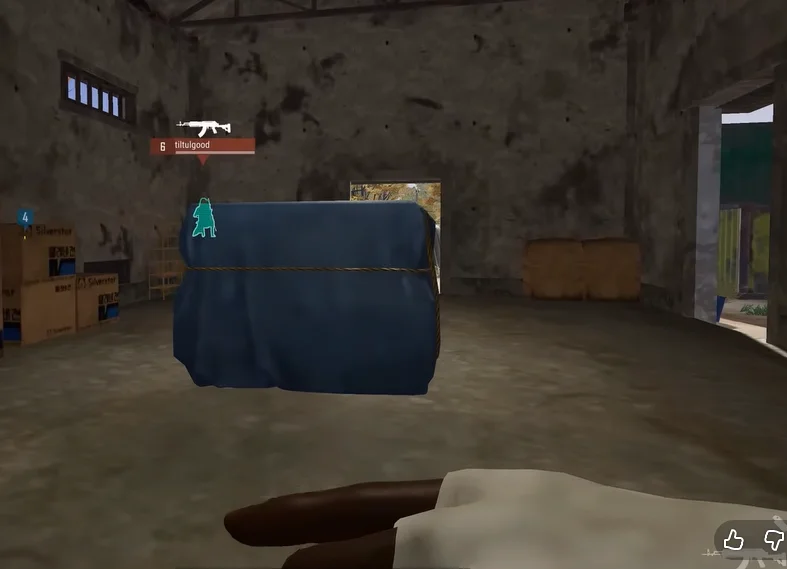
ESP (Extra Sensory Perception) in PUBG context means drawing useful game information on your screen — player locations, loot, vehicles — beyond what the vanilla HUD shows.
pubghacks.net focuses on ESP-style visuals rather than automated aiming. Full module list: /features.
Three ESP layers
Player ESP covers enemies and bots with boxes, skeletons, health, weapons, and distance.
Loot ESP marks items and attachments; filters keep only the categories you care about.
World ESP covers vehicles, airdrops, corpses, and related data when the build exposes it.
Keeping the overlay readable
Max distance caps stop far players from flooding your screen. Enemy-only mode helps in squad games. Visible check color-codes targets behind cover versus exposed targets.
Tune one category at a time after install — see the setup thread in /forums or open /purchase once you know which modules you need.
Risk reminder
ESP is still third-party software. Game and anti-cheat updates can break or detect tools. Check status on /pubg-cheats; never assume permanent safety.
Ready for PUBG Cheats?
Check live status, review features on the product page, then checkout from $35. Need help? Visit support.